A chart of accounts that splits where your return splits
Design the chart around the questions you ask each month and the lines your 2025 return already has. Where the return splits an expense in two, your accounts should split it too.

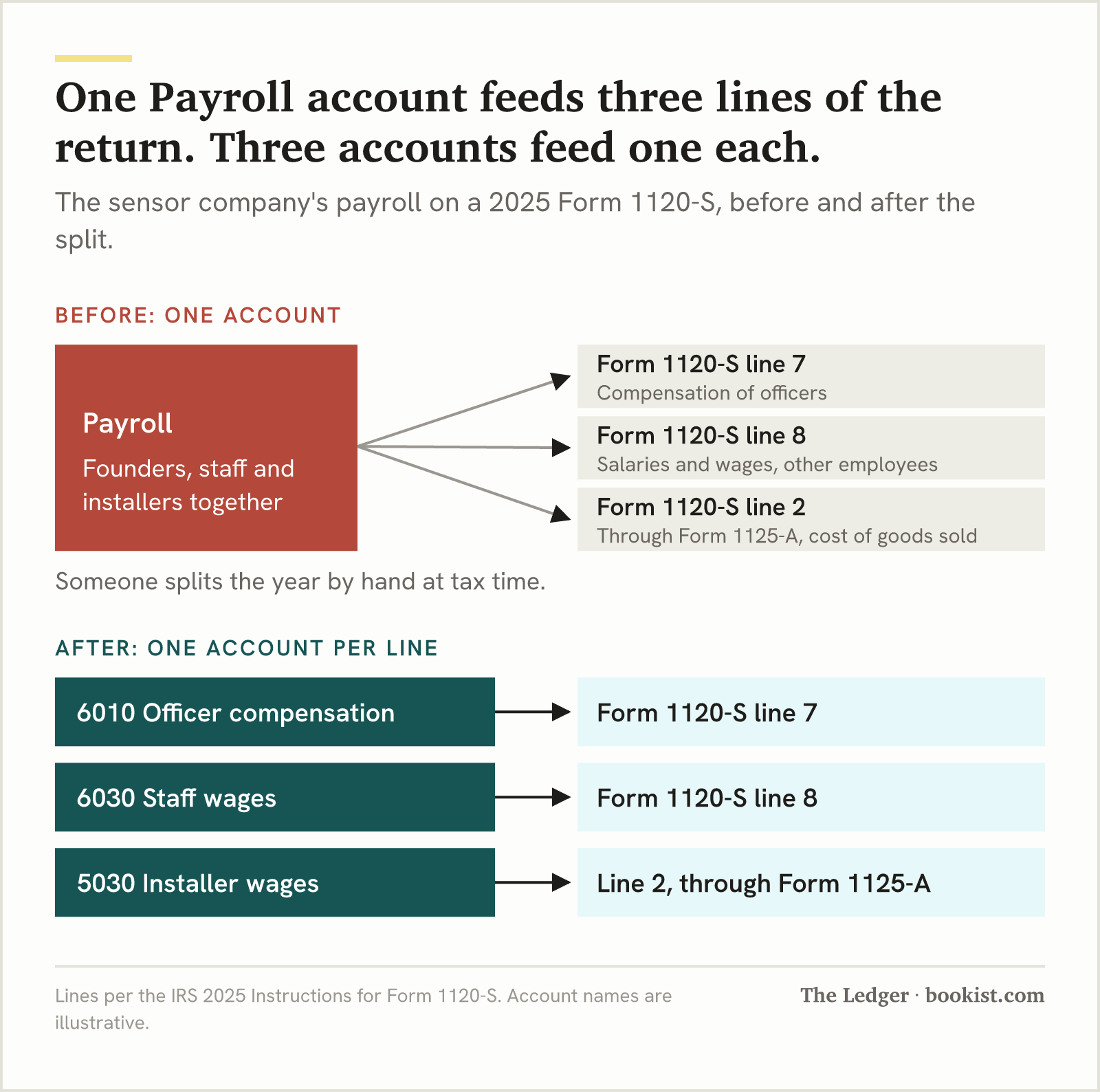
On a 2025 Form 1120-S, officer compensation goes on line 7 and other employees' wages on line 8, so an S corporation's chart of accounts needs officer pay in an account of its own.
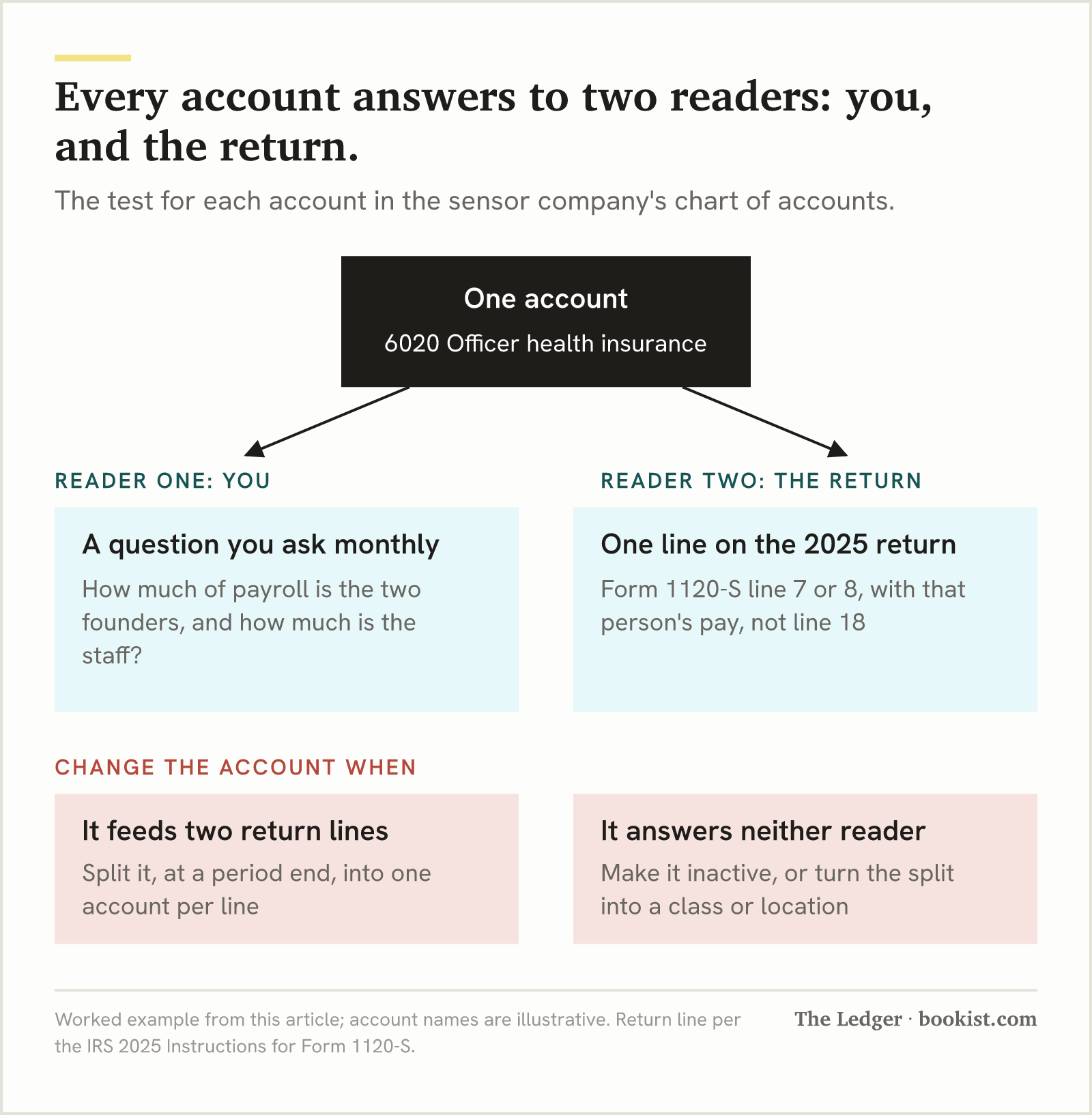
Fringe benefits for a more-than-2% shareholder, health insurance included, go on line 7 or 8 of the 2025 Form 1120-S rather than line 18, so owner and staff health insurance belong in separate accounts.
Add an account when the return or the balance sheet needs a separate figure, and use a class or location when only your own reporting needs the split.
A chart of accounts is the list of accounts your books sort every transaction into. For a small business it has two readers: you, asking what each line of the business earns, and your tax return, which has a fixed set of lines. Build it so every account answers one question you ask monthly and lands on exactly one line of the 2025 return.
The template below is for a seven-person S corporation that designs air-quality sensors for office landlords, an early-stage hardware business with more than one way of charging. It sells the sensors, a monthly monitoring subscription, and installation visits. Every account number and name in it is illustrative.
What does a chart of accounts have to do?
A chart of accounts has to put every transaction somewhere that both your monthly reports and your year-end return can read without anyone re-sorting it. Five kinds of account do that, and FASB's Concepts Statement No. 8, Chapter 4 (December 2021) defines the elements behind each one.
Kind of account | What FASB's definition says it records | Where it shows up |
|---|---|---|
Assets | A present right to an economic benefit: cash, what customers owe you, stock, equipment | Balance sheet |
Liabilities | A present obligation to transfer an economic benefit: bills, cards, loans, tax you collected | Balance sheet |
Equity | What is left of the assets after deducting the liabilities | Balance sheet |
Revenue | Inflows from delivering goods, rendering services or carrying out the business's activities | Profit and loss |
Expenses | Outflows or using up of assets from doing the same | Profit and loss |
Every bookkeeping system starts you with a list. Intuit's help article on account types and detail types in QuickBooks Online, read in October 2026, says the account type decides which report an account appears on and the detail type narrows what it tracks. That default list is a reasonable start. It was not built around your questions or your entity's return, which is the part this article is about.
How do you build a chart of accounts for a small business?
You build it in seven steps, in this order, because each one decides how many accounts the next one needs.
Write down the questions you want the profit and loss to answer every month, before you touch the software.
Split income by the way you sell, one account per revenue line you want a margin for.
Give each revenue line its own cost of delivery account, kept apart from overhead.
On an S corporation, put officer pay and officer benefits in accounts of their own.
Check every expense account against the line of your 2025 return it lands on, and split any account the return splits.
Set up the balance sheet accounts your entity type and accounting method need.
Use classes or locations, not new accounts, for every question the return does not care about.
The chart is done when every account answers one question you ask monthly and lands on one line of your return. The sections below take each step in turn.
Which questions should your chart of accounts answer?
Your chart of accounts should answer the three or four questions you would otherwise work out on a spreadsheet each month: what each revenue line earns after the cost of delivering it, what overhead costs you regardless of sales, what you and any other owners took out, and what you owe. Write those down first, because each one turns into a specific split in the chart.
For the sensor company, the founders' questions are these. Does the subscription pay for itself once hosting and support are counted? Is installation a service line or a loss leader for hardware sales? How much of payroll is the two founders, and how much is the five staff? An account that does not help answer any of them, and is not needed for the return, does not need to exist.
That is also where most default charts go wrong for a business this size. They have one Sales account and one Payroll account, so the profit and loss is correct and answers none of those questions. The fix is not more accounts everywhere. It is the right four or five splits.
How should you split income and cost of delivery?
Split income into one account for each way you charge, and give each of those its own cost of delivery account, so gross margin can be read line by line rather than worked out by hand. Cost of delivery, which the tax forms call cost of goods sold, is what you spend to deliver what you sold: the units, the parts, the people whose time goes into the job.
Revenue account | Its cost of delivery account | The question the pair answers |
|---|---|---|
4010 Hardware sales | 5010 Sensor units and components | What a sensor earns after the cost of building it |
4020 Monitoring subscriptions | 5020 Hosting and data costs | Whether the subscription covers what it costs to run |
4030 Installation services | 5030 Installer wages | Whether installation makes money or only sells hardware |
The return reads this the same way. All three revenue accounts land on Form 1120-S line 1a, gross receipts or sales, under the 2025 Instructions for Form 1120-S. All three cost accounts are reported through Form 1125-A, Cost of Goods Sold, whose line 8 is carried to line 2 of Form 1120-S. A single-member LLC filing Schedule C does the same arithmetic in Part III, where line 42 is carried to line 4.
One consequence is easy to miss. The 2025 instructions say wages already reported in cost of goods sold do not go on line 8 of Form 1120-S. So installer wages in 5030 and office wages in an overhead account are not just a reporting preference. They are two places on the return, and keeping them apart in the books is what stops them being counted twice or split by guesswork.

Why does officer pay need its own account?
On a 2025 Form 1120-S, compensation of officers goes on line 7 and salaries and wages of other employees go on line 8, so an S corporation needs officer pay in an account of its own. A single Payroll account means someone splits the whole year's payroll by hand at tax time. The 2025 Instructions for Form 1120-S also say that once total receipts reach $500,000, officer compensation is detailed on Form 1125-E and its line 4 is what goes on line 7.
Benefits split the same way, and this is the one default charts miss most often. Line 18, employee benefit programs, is for employees who own 2% or less of the stock. Fringe benefits for a more-than-2% shareholder, health insurance included, go on line 7 or 8 with that person's pay instead. A single Health insurance account that holds both founders' premiums and the staff's is feeding two lines of the return, and nothing in the books says which dollars belong where.
Account | Form 1120-S line (2025) | Why it is separate |
|---|---|---|
6010 Officer compensation | Line 7 | Officers' pay is its own line, and Form 1125-E details it at $500,000 of total receipts |
6020 Officer health insurance | Line 7 or 8, with that person's pay | More-than-2% shareholders' fringe benefits are excluded from line 18 |
6030 Staff wages | Line 8 | Employees other than officers, excluding wages already in cost of delivery |
6040 Staff health insurance and benefits | Line 18 | Employee benefit programs for people owning 2% or less |
5030 Installer wages | Line 2, through Form 1125-A | Wages in cost of goods sold stay out of line 8 |
How much the officers are paid is a different question. The same instructions say distributions and other payments to a corporate officer must be treated as wages to the extent they are reasonable compensation for services. What counts as reasonable for you, and whether an election makes sense at all, is a conversation with whoever files your return. The chart's job is narrower: to make the number they ask for a single balance you can read.
On Schedule C the owner is not on payroll at all. The 2025 Schedule C instructions exclude amounts paid to yourself from line 26, wages, and IRS Publication 334 says a sole proprietor cannot deduct their own salary or withdrawals because they are not an employee of the business. That money goes to a draw account in equity. When a single-member LLC elects S corporation status, the draw account stops filling and the officer accounts start, which is what changes in your books the day the election takes effect.
Your questions decide where the chart splits for you. The return decides where it splits for the IRS. Split where the return splits, split where your questions split, and nowhere else.
Which return line does each expense account land on?
Each overhead account should land on exactly one line of your return. The table below is the sensor company's overhead, with the line each account reaches on the 2025 Form 1120-S and, for a single-member LLC running the same business, the 2025 Schedule C. Every line number comes from the 2025 IRS instructions for that form; line 16 of Form 1120-S is from the 2025 form itself.
Account | Form 1120-S line (2025) | Schedule C line (2025) | The question it answers |
|---|---|---|---|
6100 Office and workshop rent | 11 | 20b | What the space costs |
6110 Equipment rental | 11 | 20a | What rented tools and machines cost |
6200 Repairs and maintenance | 9 | 21 | What keeping equipment running costs |
6300 Advertising | 16 | 8 | What finding customers costs |
6400 Interest on business loans | 13 | 16b, or 16a for a mortgage reported on Form 1098 | What borrowing costs |
6500 Business insurance | 20 | 15 | What cover costs, apart from health |
6510 Legal and professional fees | 20 | 17 | What outside advice costs |
6520 Supplies | 20 | 22 | What is used up running the business |
6530 Utilities | 20 | 25 | What power and connectivity cost |
6540 Travel | 20 | 24a | What getting to customers overnight costs |
6550 Business meals | 20 | 24b | Meals kept apart because their deduction is generally limited to 50% |
6560 Licenses and property taxes | 12 | 23 | What it costs to be allowed to operate |
6600 Depreciation | 14 | 13 | What equipment costs as it wears out |
6610 Amortization | 20, through Form 4562 Part VI | 27b, through Part V | What earlier spending costs as it is written off |
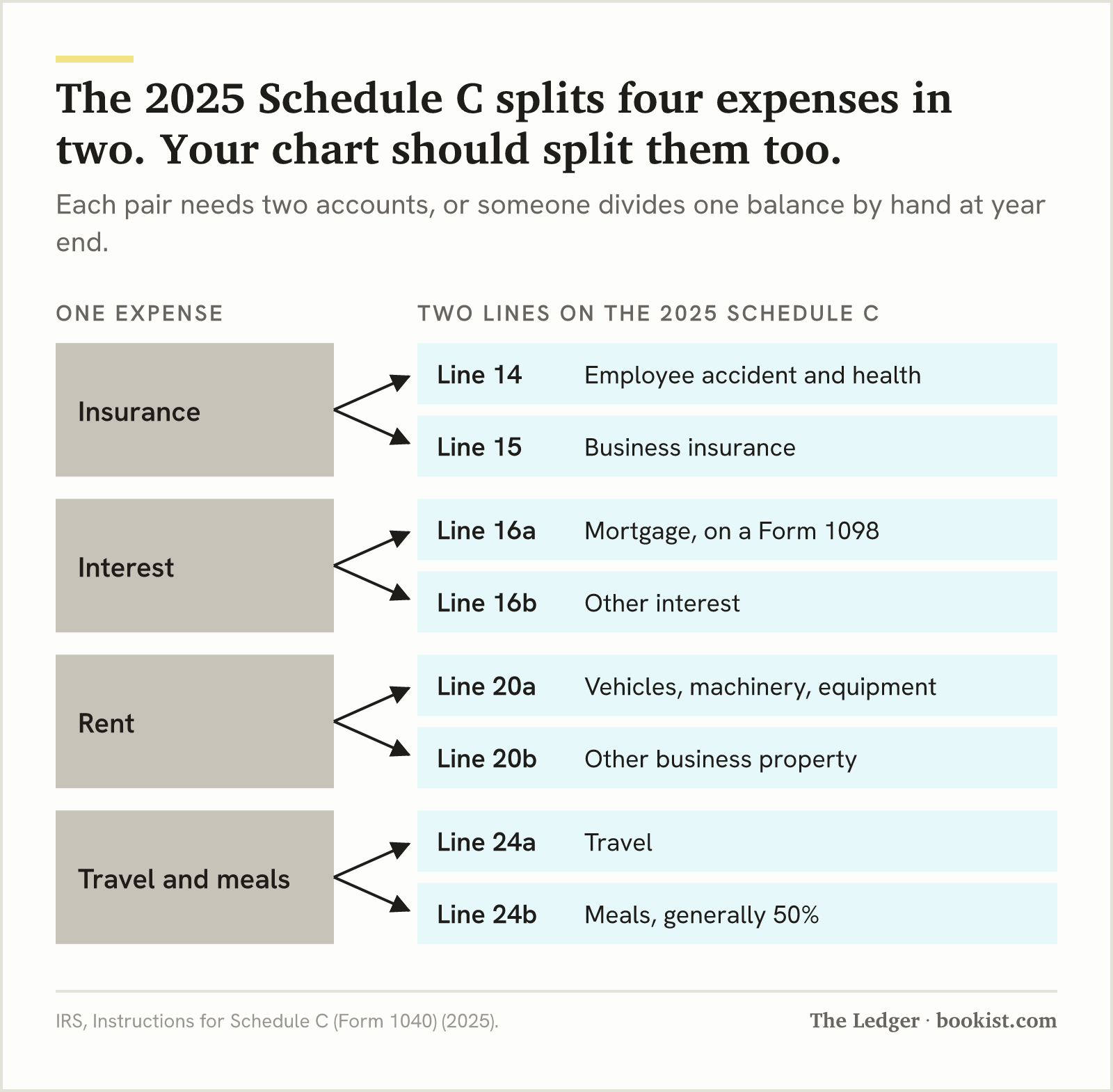
Four rows are there because the return splits them. Schedule C puts employee accident and health insurance on line 14 and other business insurance on line 15. It puts mortgage interest reported on a Form 1098 on line 16a and other interest on line 16b. It puts vehicle, machinery and equipment rent on line 20a and rent on other business property on line 20b. Travel goes on line 24a and meals on line 24b, and the 2025 Schedule C instructions say meals are generally only 50% deductible. Form 1120-S keeps rent and interest on lines 11 and 13 but folds business insurance, travel and meals into line 20, other deductions, which needs an attached statement listing each deduction by type and amount. The split accounts are what produce that statement.
Line 20 is not one account. It is several accounts whose totals are added on the return, and keeping insurance, professional fees, supplies, utilities, travel and meals apart is what lets the statement be read straight off the profit and loss.
Line numbers move. The 2025 Schedule C put other expenses on line 27b, and the 2026 draft splits interest across lines 16a, 16b and 16c. Name accounts for what they hold, never for the line number, and check the mapping against each year's instructions before the year-end close. This table does not cover Form 1065: a partnership's return has its own lines, and a multi-member LLC should ask its preparer for them.
What goes in the balance sheet accounts?
The balance sheet section of the chart holds what the business owns, what it owes and what belongs to its owners, and it depends on your entity type and accounting method more than the profit and loss does.
Section | Accounts the sensor company carries | Why |
|---|---|---|
Assets | 1010 Operating checking, 1020 Tax reserve savings, 1100 Accounts receivable, 1200 Sensor inventory, 1500 Equipment, 1510 Accumulated depreciation, 1600 Startup costs, 1610 Accumulated amortization | Inventory and equipment are costs that reach the profit and loss later, through cost of goods sold and depreciation |
Liabilities | 2010 Accounts payable, 2100 Company credit card, 2200 Payroll liabilities, 2300 Sales tax payable, 2500 Equipment loan | Each is money the business holds or owes that is not its expense |
Equity, S corporation | 3010 Common stock, 3020 Additional paid-in capital, 3100 Retained earnings, 3200 Shareholder distributions | Distributions are not expenses, and they are tracked per shareholder when there is more than one |
Equity, single-member LLC | 3010 Owner's capital, 3200 Owner's draws | The draw account collects what the owner took out during the year |
Two of those rows lead somewhere the template cannot fit. Money spent before the business opened sits in an asset account and is written off over time, which is how startup costs are recorded and amortized. And the retained earnings account is profit kept in the business rather than cash, which is why retained earnings on a balance sheet rarely matches the bank. If your books are kept on the cash method, accounts receivable and accounts payable may be empty or missing. They fill once you move to accrual.
When should you add an account, and when a class or location?
Add an account when the return or the balance sheet needs a separate figure. Use a class or location when the question is which part of the business a transaction belongs to and the return does not care. Intuit's help article on turning on class tracking in QuickBooks Online, read in October 2026, describes classes and locations as tags you assign to transactions, with a profit and loss by class or by location to read them back.
Add an account when | Use a class or location when |
|---|---|
The amount lands on a different line of the return | The amount lands on the same line whichever part of the business spent it |
The balance sheet has to show it separately, such as a loan or a tax reserve | You want the same expenses cut by office, product line or team |
You need its balance at a point in time | You need it per period, per segment |
A preparer has asked for it as a single number | The split is for your own management reporting |
The sensor company's two offices are a location, not a pair of rent accounts, because both rents land on Form 1120-S line 11. Its three revenue lines are accounts, not classes, because each needs its own cost of delivery beside it. The difference is whether the return reads the split. Where it does, the split belongs in the chart.
How do you change a chart of accounts you already use?
Change a live chart at a period end, after the month is closed, and never by deleting an account that has history. Intuit's article on making an account inactive in QuickBooks Online, read in October 2026, says an account with history can be made inactive or merged rather than deleted, and that making it inactive does not remove its transactions.
Close the month first, so the change starts on a clean date and the months before it still reconcile.
Rename an account when only its name is wrong. Its history comes with it.
Add the new accounts a split needs, then move only the current year's balances into them with one journal entry dated at the period end, with a memo saying why.
Make an account inactive when nothing new should post to it. Its past transactions still appear on reports.
Merge only true duplicates. Intuit's merge article, read in October 2026, says a merge moves every past transaction into the account you keep, requires matching name, account type and detail type, and cannot be undone.
Tell whoever files your return what changed and from which date, before they start on the year.
January is a natural moment to do it, because the year's first close is also the cleanest start date the return will see. A change mid-year works as well if the journal entry in step 3 moves the year-to-date balances, so the year's totals still land on one line each.
Open last year's profit and loss and the return that was filed from it. Write the return line next to each expense account. Any account that fed two lines, or any line that needed two accounts added by hand, is the first split to make before this year's close.
How do you know the chart of accounts is finished?
The chart of accounts is finished when four things are true at once, and you can check each one from a single profit and loss and balance sheet.
Every revenue line you want a margin for has its own income account and its own cost of delivery account beside it.
Every expense account lands on exactly one line of your 2025 return, and no line needs two accounts added by hand except line 20 of Form 1120-S, whose statement lists them.
On an S corporation, officer pay and officer benefits sit in accounts that no staff payroll ever reaches.
Nothing in the chart exists only to answer a question a class or location could answer.
If keeping all of that true every month is the part that slips, having someone keep the books to that chart monthly is a different job from designing it once.
How should a chart of accounts be numbered?
A chart of accounts is numbered in blocks by kind, so an account's number tells you where it sits on the statements before you read its name. The template here uses 1000s for assets, 2000s for liabilities, 3000s for equity, 4000s for revenue, 5000s for cost of delivery and 6000s for overhead, and leaves gaps of 10 between accounts so a split can sit next to the account it came from. The numbers are a convention, not a rule. What the return reads is the account and what it holds, never its number.
How do I set up a chart of accounts in QuickBooks Online?
In QuickBooks Online you set up a chart of accounts by choosing an account type and a detail type for each account, starting from the list QuickBooks creates for your business type. Intuit's help article on account types and detail types, read in October 2026, says the account type determines which report the account appears on and the detail type narrows what it tracks within that type. Choose the account type to match the five kinds in the first table above, name each account for what it holds, and add the officer, cost of delivery and split overhead accounts your return needs before the first transactions post to them.
A profit and loss that answers the questions you actually ask
If your chart still has one Sales account and one Payroll account, the splits that matter depend on how you sell and how you are taxed. Bring last year's profit and loss and your return, and we will walk through where your chart should split with you.
This article explains how a chart of accounts and the 2025 federal return forms generally fit together. It is not tax advice for your situation.
Operations background across retail, property management, and e-commerce. Writes step-by-step guides for owners who need the answer, not the theory.